

Privacy impact assessment automation makes sense for any organization running repeatable, high-volume assessments across vendors, systems, or data flows, but it should stay hybrid where profiling, new technology, or novel data uses raise legal complexity. Enterprises, agencies, and contractors juggling frequent vendor and data-flow changes benefit most. The regulatory case is strong: state privacy triggers and the need for audit-ready evidence both favor automating the repetitive parts of the process.
TL;DR:
- Automating routine assessments makes data flow mapping and risk scoring more efficient, but it should stay hybrid for complex or novel data uses.
- Effective tools need accurate data inventories and customizable templates, with integrations that pull live system and vendor data to ensure reliability.
- State privacy laws and the NIST Privacy Framework support automation for consistent, repeatable risk assessments that are audit-ready over time.
- High-volume, low-risk assessments benefit most from automation, while novel or high-risk cases require human review and expert judgment.
- Successful enterprise rollout involves phased pilots, proper data mapping, customized configurations, and clear ownership for ongoing management.
Table of Contents
- How Does Privacy Impact Assessment Automation Actually Work?
- What Features Should You Expect in PIA Automation Tools?
- How Does Automation Align With NIST and State Privacy Laws?
- When Should You Automate a PIA vs. Keep Manual Review?
- How Do You Roll Out PIA Automation Across an Enterprise?
- Who Owns Automated PIAs, and How Do You Measure Success?
- What Does Automation Look Like in Government and Regulated Programs?
- What Should You Do Next to Automate Your PIA Program?
- How Rutledge & Associates Helps You Automate PIA Programs
- A Practical Note on Where PIA Automation Goes Wrong
- Sources
How Does Privacy Impact Assessment Automation Actually Work?
Automation does not replace judgment. It replaces repetition. Most platforms follow a consistent sequence that turns a manual, spreadsheet-driven process into something closer to a managed pipeline.
- Threshold screening. A short questionnaire flags whether a project touches personal data in a way that triggers a full assessment, filtering out low-risk requests before anyone spends hours on paperwork.
- Data inventory and flow mapping. The system pulls or references an existing data inventory, showing where data originates, where it moves, and who touches it, instead of asking analysts to reconstruct flows from memory.
- Template-driven questionnaires and scoring. Configurable templates route the right questions to the right stakeholders, and scoring logic converts answers into a consistent risk rating.
- Remediation tracking and reporting. Flagged risks generate tickets, owners, and deadlines, and the system exports a regulator-ready report with a full audit trail.
The value shows up at the seams. A privacy impact assessment engine built around data flow mapping and configurable scoring can generate an assessment and a records-of-processing export from the same underlying data, cutting duplicate entry that plagues manual programs.
What Features Should You Expect in PIA Automation Tools?
Feature sets vary by vendor, but most mature tools converge on the same core categories. Knowing them helps you evaluate a product against your actual workflow rather than a sales deck.
- Assessment templates, often pre-mapped to specific legal frameworks, that your team can customize per business unit or data type.
- RoPA and records automation, generating exportable records-of-processing that satisfy both internal governance and external audit requests.
- Dynamic risk scoring and visualization, showing risk heat maps across the organization instead of one assessment at a time.
- Integrations with SIEM, CMDB, and vendor risk portals, so the assessment pulls live system and vendor data rather than relying on someone's memory of what changed last quarter.
- Collaboration and sign-off workflows, routing an assessment to legal, security, and business owners in sequence with a recorded approval chain.
Pro Tip: Before you shop for features, audit your current data inventory. A tool with sharp risk scoring is only as good as the data flow map feeding it. If that map is stale or incomplete, automation will just formalize bad information faster.
How Does Automation Align With NIST and State Privacy Laws?

The regulatory case for automation rests on two pillars: a national risk-management standard and a patchwork of state-level triggers that reward consistency.
The NIST Privacy Framework treats privacy risk assessment as an enterprise risk-management function, not a compliance checkbox, and recommends building Profiles that compare your current state against a target state to prioritize mitigation. Automated tools that generate consistent, repeatable risk scores map naturally onto this model. The draft update to NIST Privacy Framework 1.1 refines those Profiles further, giving teams a clearer target for continuous improvement.
On the state side, California, Colorado, Virginia, and Connecticut all require some form of assessment when processing presents heightened risk, and several states allow a PIA completed for one law to satisfy another if it is reasonably comparable. That reuse provision is the whole argument for standardized, templated documentation.
What this means in practice:
- Profiling, targeted advertising, and sensitive data processing are near-universal state triggers.
- Automated decision-making and AI-driven profiling are increasingly enumerated triggers in newer state guidance.
- Federal agency PIAs and HIPAA-adjacent programs add sector-specific documentation requirements on top of the state baseline.
Consistent, exportable evidence is what makes an assessment defensible months or years later, when a regulator or auditor asks how a decision was made.
When Should You Automate a PIA vs. Keep Manual Review?
Not every assessment belongs on autopilot. The decision usually comes down to two variables: how often you run a given type of assessment, and how novel or legally ambiguous the underlying data use is.
- Automate high-volume, low-novelty assessments — routine vendor onboarding, standard SaaS integrations, and recurring internal data flows that follow a known pattern.
- Keep manual, expert-led review for novel or high-risk cases — new AI profiling models, biometric data uses, or first-of-its-kind data sharing arrangements where the legal exposure is unclear.
- Design a hybrid workflow: automated screening filters the bulk of requests, automation handles the standard cases, and a targeted expert reviews anything the screening flags as complex. A hybrid model like this tends to be the fastest path to scale without sacrificing legal defensibility.
- Run a simple cost check: multiply average manual hours per assessment by your annual assessment volume, then compare that against tool licensing and integration cost.
How Do You Roll Out PIA Automation Across an Enterprise?
A successful rollout looks less like a software launch and more like a phased pilot with clear checkpoints.
- Scope a pilot around one business unit or one recurring assessment type, with success metrics defined up front (time-to-complete, percentage automated, remediation closure rate).
- Connect your data inventory and data-flow mapping first. Automation without a reliable inventory just automates guesswork.
- Configure templates and scoring matrices to match your actual risk tolerance rather than accepting default vendor settings.
- Wire remediation workflows into existing systems — vendor risk platforms, security ticketing, and change-management tools — so flagged risks generate real tickets, not orphaned spreadsheet rows.
- Operationalize review cadence and SLAs, including who signs off on high-risk findings and how often standing assessments get reassessed.
Procurement matters as much as configuration here. Government programs in particular benefit from working with a partner experienced in selecting IT partners for public sector success, since defined-scope delivery avoids the staff-augmentation trap that stalls so many automation pilots.
- Pilot metrics should include both speed (time-to-close) and quality (percentage of findings requiring rework).
- Reassessment triggers should be written into your policy, not left to memory.
Pro Tip: Run your pilot on a data flow you already understand cold. If the tool struggles with a use case your team can map blindfolded, it will struggle far more on your genuinely ambiguous cases.
Who Owns Automated PIAs, and How Do You Measure Success?
Ownership questions surface fast once automation removes the friction that used to force cross-team meetings. Someone still has to be accountable for outcomes.
Most mature programs assign primary ownership to the privacy office, with risk and product teams holding secondary responsibility for their own domains. That split keeps the privacy office focused on standards and audit readiness while product and engineering teams own remediation for issues in their systems.
A few metrics matter more than the rest:
- Percentage of assessments completed via automation versus manual pathways.
- Time-to-close for flagged remediation items, which is often the clearest signal of whether automation is actually reducing risk or just generating more paperwork.
- Assessment coverage across the full vendor and system inventory, not just the systems someone remembered to submit.
Retention and versioning deserve equal attention. Every assessment, along with its scoring logic and sign-off chain, needs to be preserved in a form a regulator or auditor could review years later. Building that discipline into your compliance checklist now saves a scramble later.
What Does Automation Look Like in Government and Regulated Programs?
Public-sector programs carry a different burden than private-sector ones: procurement rules, audit cycles, and multiple layers of oversight. Automation has to fit inside that structure, not around it.
Government modernization work rarely fails because the technology is wrong. It fails because the delivery model asks agencies to manage staff instead of outcomes, which is exactly the gap that defined-scope, outcome-owned automation work is built to close.
Rutledge & Associates, LLC, operating under the Primereadysub brand, works with state agencies and prime contractors on exactly this kind of compliance-heavy modernization, often reducing processing time and improving audit readiness through defined work packages rather than staff augmentation. As an SDVOSB and woman-owned firm, the company's contracting status also aligns directly with set-aside requirements common in public-sector procurement.
What Should You Do Next to Automate Your PIA Program?
If your organization runs frequent, similar assessments, automating the repetitive parts is the right call. Novel or high-stakes cases still need a human expert in the loop.
- Stand up a threshold screening tool to separate routine assessments from complex ones.
- Launch a scoped pilot on one business unit before rolling automation out organization-wide.
- Fix your data mapping first, since it feeds every downstream assessment.
Measure pilot success by time-to-close and remediation quality, not just volume processed.
How Rutledge & Associates Helps You Automate PIA Programs
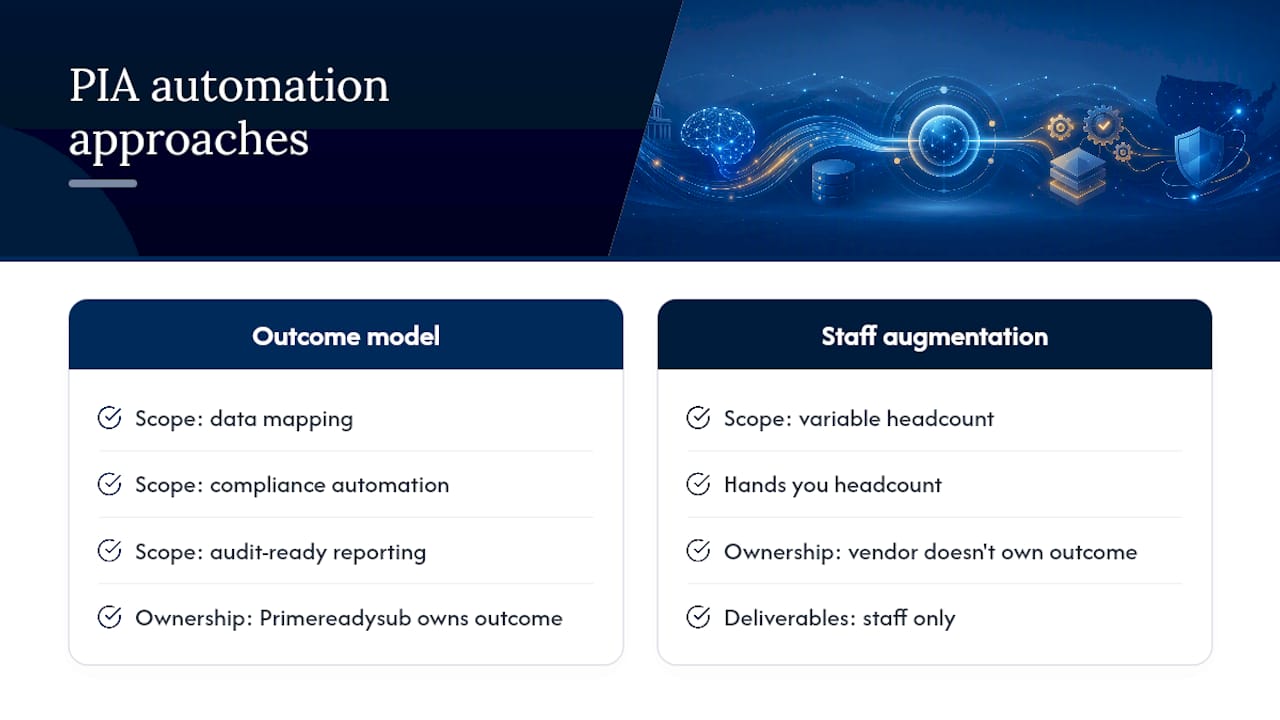
Rutledge & Associates, LLC builds defined-scope work packages for exactly the problems this article covers: data mapping, compliance automation, and audit-ready reporting for agencies and prime contractors. Unlike staff-augmentation vendors that hand you headcount and hope, Primereadysub owns the outcome, whether that's a working data inventory, a configured scoring matrix, or a full remediation workflow tied to your existing systems. That ownership model matters most on compliance-heavy programs where oversight burden is already high and your team cannot afford another vendor to manage. If you are evaluating automation's role in public contracts or planning a PIA automation pilot for a state agency, reach out through Primereadysub to scope a defined work package for your next assessment cycle.
A Practical Note on Where PIA Automation Goes Wrong
Over-automating is the most common mistake: teams route every assessment through the same scoring logic, including the novel AI use case that genuinely needed a specialist's eyes. Weak or stale data sources are the second failure, since even good scoring logic produces garbage output on top of a bad inventory. Build stakeholder buy-in early, and reach out if you're managing a government-scale program with edge cases worth discussing.
— Randy
Sources
- NIST Privacy Framework: A Tool for Improving Privacy through Enterprise Risk Management, Version 1.0
- FAQs on PIAs: Understanding U.S. State Privacy Impact Assessment Requirements - Lexology
- US Privacy Law: When to Conduct a Privacy Impact Assessment And What to Include | OneTrust