

Automation makes HIPAA compliance continuous instead of a once-a-year scramble. It reduces manual audit work substantially, but it does not replace human judgment on risk acceptance or scope decisions. If you manage compliance for a hospital system, health plan, or a government IT program that touches protected health information, the fastest path to measurable results is starting narrow.
Begin with three workflows:
- Access reviews and offboarding, since stale permissions are the single most common finding in security audits.
- Vendor and business associate agreement (BAA) tracking, so no third party touches PHI without a signed, current agreement.
- Policy attestations, which prove staff actually read and acknowledged security policies rather than just signed once and forgot.
Pro Tip: If your organization handles PHI under a federal contract, map your HIPAA controls to FAR 52.204-21 and NIST SP 800-171 early. Procurement officers will ask for that mapping before they ask about your HIPAA policy binder.
Key Takeaways
HIPAA compliance automation works when it centralizes recurring evidence and gets paired with clear human ownership over risk decisions and control validation.
| Point | Details |
|---|---|
| Start with three workflows | Automate access reviews, BAA tracking, and policy attestations before expanding to lower-priority tasks. |
| Map controls, not just tasks | Contractors handling PHI must map HIPAA controls to FAR 52.204-21 and NIST SP 800-171 for procurement audits. |
| Automation reduces prep time, not judgment | Evidence centralization cuts audit prep hours, but annual risk analysis still requires human validation. |
| Track five core KPIs | Measure audit prep hours, training completion, vendor review cycle time, open-risk age, and detection time. |
| Pair tools with an outcome-owned partner | Rutledge & Associates delivers defined-scope compliance automation and FAR/NIST mapping for government programs. |
Table of Contents
- What Hipaa Compliance Automation Can and Cannot Do
- Which HIPAA Workflows Should You Automate First?
- Building an Implementation Checklist That Satisfies HIPAA and Federal Contract Rules
- How Do You Measure ROI on Compliance Automation?
- A Practitioner's View on Government Compliance Automation
- Best Practices for Rolling Out HIPAA Automation the Right Way
- What Actually Goes Wrong When Teams Deploy Compliance Automation
- How Should You Evaluate a Compliance Automation Vendor?
- Keeping Automated Compliance Systems Current Over Time
- Why the Conventional Advice on Compliance Automation Misses the Point
- How Rutledge & Associates Approaches Compliance Automation for Government Programs
- Sources
What Hipaa Compliance Automation Can and Cannot Do
Automation's core job is evidence capture. A well-configured system logs timestamped attestations, runs recurring control tests (password rotation, encryption status, access recertification), and keeps a change history that shows exactly when a control was tested and by whom. That continuous record is what turns a chaotic pre-audit scramble into a folder you can hand an auditor on request.
The practical value shows up in integrations, not the dashboard alone. Your identity provider (IdP) feeds access and authentication data. Your HRIS triggers offboarding the moment someone's employment status changes. Your EHR and cloud infrastructure logs show where PHI actually lives and moves. SIEM tools flag anomalous access patterns. Ticketing systems document remediation. Document stores hold the BAAs and policies themselves. Each connection closes a gap that a spreadsheet-based program leaves wide open.
What automation cannot do is decide whether a risk is acceptable, or whether a control that "passed" a scripted test is actually effective against a real-world attack path. Automated risk-assessment tools speed up gap analysis, but they don't replace the annual risk analysis required under 45 CFR §164.308(a)(1), and someone qualified still has to validate scope and sign off on exceptions. Treat automation as an evidence engine, not a compliance officer.
Which HIPAA Workflows Should You Automate First?
Not every compliance task deserves the same urgency. Rank them by how much manual time they eat and how often auditors flag them.
- High priority: access reviews, user offboarding, and BAA/vendor tracking. These generate the most audit findings and the most manual hours when done by hand.
- Medium priority: policy attestations, security awareness training tracking, and risk register updates. Important, but lower frequency than access changes.
- Lower priority (automate after the pilot proves value): incident response tabletop scheduling, vendor risk scoring refinement, and dashboard reporting for executives.
Teams that centralize this evidence in one system commonly report 50 to 80 percent reductions in audit prep time compared to pulling records from shared drives and email threads.
Don't try to automate everything in month one. Pilot two or three high-impact workflows, assign a named owner to each, set a baseline (how many hours does offboarding currently take? how many BAAs are overdue?), and run the pilot for 6 to 12 weeks before expanding. Measure against that baseline, not against a vendor's marketing claim.
Building an Implementation Checklist That Satisfies HIPAA and Federal Contract Rules
Healthcare organizations and government contractors face overlapping but distinct obligations, and skipping the mapping step is where most implementations stall. For agencies that handle PHI, understanding HIPAA compliance for EMS: what agencies must do now can clarify how HIPAA obligations intersect with NIST/FAR requirements.
Step 1: Scope and inventory PHI. Map every system, database, and data flow that touches protected health information, including shadow IT and legacy interfaces most staff have forgotten about.
Step 2: Map controls to frameworks. Translate HIPAA Security Rule requirements into automated checks. Contractors handling PHI for government programs also need to map to FAR 52.204-21's 15 basic cybersecurity requirements and relevant NIST SP 800-171 or SP 800-53 controls, since dual tracking creates rework at audit time.
Step 3: Integrate and assign ownership. Connect your IdP, HRIS, EHR, and SIEM. Every automated workflow needs a named owner and a service-level agreement for response time, plus a documented retention schedule consistent with the training-record retention requirements under 45 CFR §164.530(j).
Step 4: Test detection and notification, then document. Run a simulated breach scenario to confirm your notification workflow actually fires within required timeframes, and package the resulting evidence for OCR or procurement review.
| Step | Primary Output |
|---|---|
| Scope and PHI inventory | Data-flow map covering every system touching PHI |
| Control mapping | HIPAA controls cross-referenced to FAR/NIST requirements |
| Integration and ownership | Connected systems with named owners and SLAs |
| Testing and documentation | Audit-ready evidence package for OCR and procurement reviews |
Pro Tip: Government IT teams juggling multiple frameworks at once can save real time by reviewing a federal compliance checklist built specifically for procurement audit expectations rather than reinventing the mapping from scratch.
How Do You Measure ROI on Compliance Automation?
Auditors and finance leaders ask for different proof, so track metrics that satisfy both.
- Audit prep hours: compare the time spent gathering evidence before automation versus after.
- Training completion rate: the percentage of staff current on required security awareness training.
- Vendor review cycle time: how long it takes to complete a new BAA review or annual vendor risk reassessment.
- Open-risk age: how many days a flagged risk sits unresolved on the register.
- Mean time to detect and notify: the gap between a potential breach event and the point your team could produce a compliant notification.
Continuous evidence collection shortens OCR inquiries because you're not reconstructing six months of history under deadline pressure. Set your baseline in week one of a 90-day pilot, measure again at day 45, and again at day 90. If audit prep hours haven't dropped and open-risk age hasn't shrunk by the second checkpoint, the workflow you automated probably wasn't the right first pick.
A Practitioner's View on Government Compliance Automation
Randy leads the compliance and modernization practice at Rutledge & Associates, a Service-Disabled Veteran-Owned Small Business (SDVOSB) and SBA-certified firm that builds outcome-owned compliance automation and DevOps pipelines for state and federal programs.
Firm-level track record includes:
- Public-sector modernization engagements in Maryland, New York, and Florida focused on audit readiness and real-time program visibility.
- A practice model built around owning defined scopes of work, not staff augmentation, so agencies and prime contractors get accountable outcomes.
Compliance automation only earns its budget line when it produces evidence an auditor trusts on sight, not another dashboard nobody opens between audits.
Best Practices for Rolling Out HIPAA Automation the Right Way
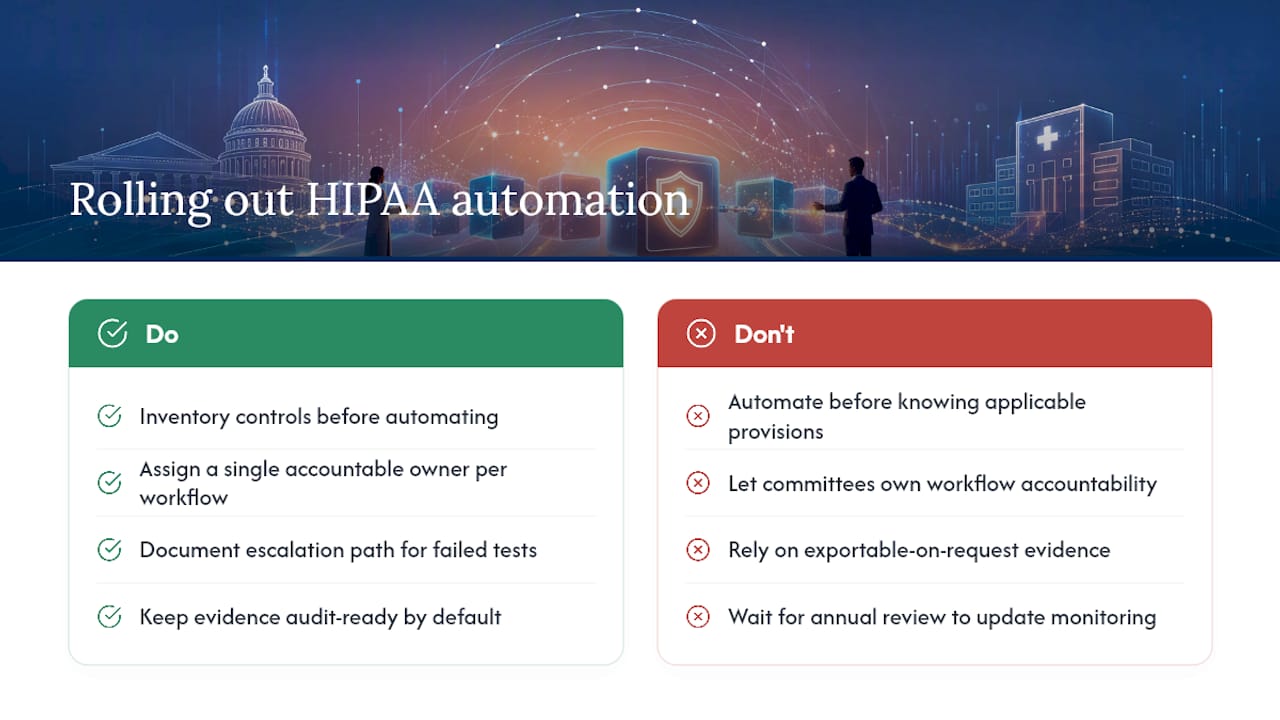
Start with a control inventory before you buy or configure anything. Teams that automate before they know exactly which HIPAA Security Rule provisions apply to their environment end up automating the wrong checks and re-doing the work six months later.
Assign a single accountable owner per workflow, not a committee. Compliance automation fails quietly when three departments assume someone else is watching the dashboard. Pair every automated control test with a documented escalation path: what happens when a test fails, who gets notified, and how fast.
Keep your evidence format audit-ready by default rather than exportable-on-request. If your system can generate a clean package for OCR or a procurement audit at any moment, you've built the right architecture. If it takes a week of manual formatting first, you've automated data collection but not audit readiness.
Finally, treat regulatory changes as a standing input, not a one-time update. Proposed OCR rule changes have pushed toward stricter technical safeguards like universal encryption and multi-factor authentication, and your automated monitoring should be configured to reflect new requirements as they finalize rather than waiting for the next annual review cycle.
What Actually Goes Wrong When Teams Deploy Compliance Automation
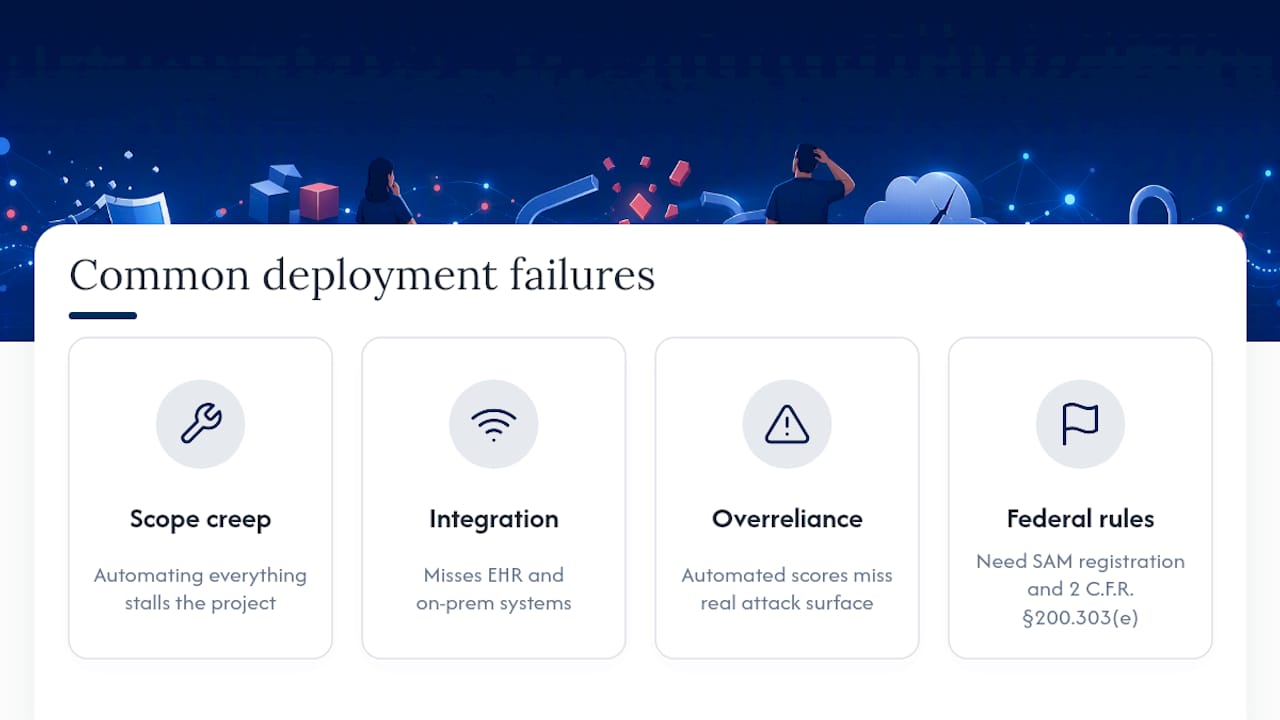
The most common failure isn't technical. It's scope creep before launch: teams try to automate every HIPAA requirement simultaneously instead of piloting a handful of high-impact workflows, and the project stalls under its own complexity.
Integration gaps cause the second most common problem. A tool that connects cleanly to your identity provider but not your EHR or legacy on-premises systems leaves blind spots exactly where PHI risk is highest. Before signing a contract, confirm the tool's actual integration list against your real technology stack, not its marketing page.
Overconfidence in automated risk scoring is the subtler risk. A tool can flag that a control "passed" a scripted test while missing that the control doesn't actually address your organization's real attack surface. Human validation of control effectiveness remains a requirement, not a nice-to-have, under the annual risk analysis mandate.
Government contractors face an added pitfall: assuming HIPAA compliance alone satisfies federal cybersecurity requirements. Organizations pursuing federal grants or contracts also need SAM registration and baseline cybersecurity measures under 2 C.F.R. §200.303(e), which HIPAA compliance alone does not cover.
How Should You Evaluate a Compliance Automation Vendor?
Judge vendors on integration depth first. A platform that only connects to your identity provider is far less useful than one that also pulls from your EHR, cloud infrastructure, and ticketing system, since platforms mapping requirements directly to technical controls give you a live posture view instead of a static snapshot.
Ask for a sample audit-evidence package during the sales process, not after signing. If the vendor can't show you what an actual OCR-ready export looks like, you're buying a dashboard, not an audit tool.
Check whether the platform supports cross-framework mapping if you handle any government contracts. A tool built purely for HIPAA-covered entities may not map cleanly to FAR 52.204-21 or NIST SP 800-171, forcing you to maintain a second, disconnected compliance system for federal work.
Confirm ownership and SLA features exist natively. If assigning a control owner and tracking response time requires a separate project management tool bolted on afterward, that's a sign the platform wasn't built with operational accountability in mind. For public-sector buyers specifically, comparing government compliance software options built for procurement-heavy environments tends to surface gaps that generic HIPAA tools miss entirely.
Keeping Automated Compliance Systems Current Over Time
A compliance automation system is not a set-and-forget purchase. Regulatory frameworks shift, and 2025 to 2026 OCR activity has trended toward mandatory technical safeguards that weren't explicit requirements a few years ago.
Schedule a quarterly review of your control mappings against current HIPAA Security Rule guidance and, for contractors, current NIST SP 800-171 revisions. Assign someone specifically to track proposed rule changes rather than hoping your vendor's update notes catch everything relevant to your environment.
Re-baseline your KPIs annually. Audit prep hours, open-risk age, and training completion targets that made sense at launch may need adjustment as your organization scales or your PHI footprint changes through mergers, new EHR modules, or expanded vendor relationships.
Test your breach notification workflow at least once a year with a simulated scenario, not just a policy read-through. A workflow that looks correct on paper but hasn't been stress-tested is a liability waiting for a real incident to expose it.
Why the Conventional Advice on Compliance Automation Misses the Point
Most guidance on this topic treats automation as a checkbox exercise: buy a platform, connect a few systems, call it done. That framing undersells what actually separates organizations that pass audits smoothly from those that scramble every cycle.
The real differentiator is ownership discipline. A tool that logs a failed control test is worthless if nobody is accountable for fixing it within a defined window. Healthcare organizations get this wrong constantly by treating automation as an IT department's side project instead of a cross-functional program with named owners and enforced SLAs.
Government contractors face a sharper version of the same mistake. Many assume HIPAA compliance and federal cybersecurity compliance are the same conversation. They're not. FAR 52.204-21 and NIST mapping requirements exist independently of HIPAA, and treating them as an afterthought is how contractors lose procurement opportunities over avoidable documentation gaps.
Prioritize the mapping work before you buy tooling. Everything else, integrations, dashboards, alerts, is easier once the control mapping is right.
How Rutledge & Associates Approaches Compliance Automation for Government Programs
Rutledge & Associates builds outcome-owned compliance automation for state agencies and prime contractors instead of dropping in staff to manage a tool you already bought. The firm's engagements cover HIPAA-to-NIST/FAR control mapping, DevOps and CI/CD pipeline implementation, and audit evidence packaging designed to hand an OCR reviewer or procurement auditor a clean, ready package on request, not a scramble.
As a Service-Disabled Veteran-Owned Small Business and SBA-certified firm with public-sector delivery history in Maryland, New York, and Florida, Rutledge & Associates takes on defined scopes of work with clear deliverables rather than open-ended staffing contracts. That structure gives program managers a fixed outcome to hold the firm accountable to, not another vendor relationship to babysit.
If your organization needs a scoping call or a readiness assessment to see where your current compliance program has gaps against FAR and NIST requirements, start that conversation with Rutledge & Associates.
Sources
- Federal Acquisition Regulation (FAR) 52.204-21
- 6 key benefits of automated HIPAA compliance (SecureSlate Blog)
- HIPAA, CMMC & CJIS: The 2026 Compliance Deadline Guide - SkyPort IT