

Adopt a SAF-aligned automation pipeline for STIG hardening automation: run policy-as-code checks inside CI/CD, generate results in Heimdall Data Format, and convert them into CKL files and eMASS-ready exports. This approach, built around the MITRE Security Automation Framework, produces the exact evidence assessors expect while cutting the manual labor that traditionally drags out authorization. The outcome is a faster, more defensible path to ATO and continuous compliance.
TL;DR:
- Teams should tag container images and VM templates with specific STIG benchmark versions and dates at build time to ensure accurate audit trail and test against updates.
- Using Heimdall Data Format for scan results and converting them with SAF CLI into checklist files guarantees compliance evidence aligns with DoD review requirements.
- Automating the hardening process during image build reduces risks associated with live system changes, preventing compliance drift and simplifying reconciling assessments.
- A practice of normalizing scan results into a single format and generating structured exports streamlines review processes and improves evidence verification.
- Partnering with vendors for scoped, rapid implementations delivers working automation pipelines and export packages on fixed timelines, unlike slow internal buildouts.
Table of Contents
- What Is MITRE SAF and How Do Its Five Pillars Map to STIG Automation?
- How Do You Build a STIG Hardening Automation Pipeline?
- Which Tools Fit Into a STIG Automation Pipeline?
- How Does Automated STIG Output Become ATO Evidence?
- Rutledge & Associates' Approach to STIG Automation
- What Practitioners Get Wrong About STIG Automation
- Get a Managed STIG Automation Engagement
- Where to Go for Official STIG Automation Documentation
- Sources
- FAQ
What Is MITRE SAF and How Do Its Five Pillars Map to STIG Automation?
The MITRE Security Automation Framework organizes STIG automation into five pillars: Plan, Harden, Validate, Normalize, and Visualize. It gives DoD programs a common structure for turning scattered scripts and manual checklists into a repeatable pipeline, and it's the closest thing the community has to a standard vocabulary for this work.
Each pillar corresponds to a concrete task:
- Plan covers selecting the right STIG baselines and threat models for a system, often using Vulcan to author or tailor requirements before hardening begins.
- Harden is the remediation step, where configuration management tools apply fixes to images or running systems.
- Validate runs automated checks (InSpec profiles, for example) against a target and produces raw results.
- Normalize converts those raw results into Heimdall Data Format so different scanners and tools speak the same language.
- Visualize puts HDF data into Heimdall or a dashboard so ISSOs and program managers can see compliance posture at a glance.
SAF and its associated projects, including Vulcan and Heimdall, are distributed under an Apache-2 license, which matters for government use. Programs can adapt the tooling freely, share STIG-ready content across agencies, and avoid vendor lock-in on core validation logic. For teams building their first automated STIG compliance program, SAF is the sensible starting frame rather than a from-scratch build.
How Do You Build a STIG Hardening Automation Pipeline?
A working pipeline moves through six stages, each owned by a specific role. Skipping stages, or collapsing them into a single ad hoc script, is usually what causes automation projects to stall during an assessment.
- Source control. Developers commit STIG baselines, InSpec profiles, and configuration code (Ansible, Chef, Puppet, or Terraform) to a version-controlled repository, tagged to the STIG benchmark version they target.
- Build-time hardening. CI pipelines apply remediation during image build, not against live production systems. Baking hardened configurations into golden images means every deployed instance starts compliant instead of drifting toward it.
- Automated validation. CI runs InSpec or equivalent checks against the built artifact and produces raw scan results tied to that specific build.
- Artifact generation. Security automation tooling normalizes results into HDF, then converts HDF into CKL using the SAF CLI.
- Attestations. Controls that can't be automated (physical security, some policy documentation) get logged as manual attestations by the ISSO, filed alongside the automated evidence.
- Authorization inputs. The complete package, automated and manual, feeds into eMASS for reviewer consumption.
Remediating a live, already-deployed system is riskier than fixing the image and redeploying, because untested runtime changes can break dependencies reviewers never see coming. Pin your STIG content version in the repository and tag every image with the exact benchmark release used to build it. When DISA publishes a new STIG revision, that tag tells you instantly which fleet segments are stale.
Pro Tip: Tag container images and VM templates with the STIG benchmark version and date at build time. When an auditor asks "which STIG revision was this hardened against," you want a build label to answer that question, not a memory.
Which Tools Fit Into a STIG Automation Pipeline?
Matching the right tool to each pipeline stage keeps the workflow from turning into a patchwork of one-off scripts nobody can maintain after the original engineer leaves.
- SAF CLI and Vulcan handle content authoring and format conversion. Vulcan helps teams draft and tailor STIG-ready InSpec profiles; the SAF CLI runs commands like
saf convert hdf2cklto translate scan results into DISA checklist files usable by STIG Viewer. - Heimdall and HDF serve as the normalization and visualization layer. Any scanner that outputs HDF can feed the same downstream reporting, which is the point of standardizing on the format.
- PowerStig is a PowerShell module built on Desired State Configuration that automates Windows STIG hardening and produces MOF files and checklists ready for DevOps integration, according to its GitHub documentation.
- StigRepo and SCAR, built by Microsoft, automate building DSC configs, MOF files, and STIG checklists directly from Active Directory or Azure inventories, which speeds up hardening across large Windows and Azure estates, per the StigRepo project.
- Ansible, Chef, Puppet, and Terraform apply remediation as code at build time across Linux and mixed environments, giving teams a single source of truth for what "hardened" means for a given image.
Agent-based enforcement matters for disconnected or air-gapped systems that can't reach a central CI server. Unified automation platforms with local enforcement and deferred sync, as described by SteelCloud, suit those environments better than agentless, pipeline-triggered checks that assume constant connectivity.
How Does Automated STIG Output Become ATO Evidence?
Assessors don't want raw scan logs. They want checklist files and structured exports that map cleanly to an authorized asset list, which is exactly what the SAF toolchain is built to produce.
- HDF results from Heimdall run through
saf convertto generate CKL files that load directly into STIG Viewer, the tool most DoD reviewers already use. - Checklist metadata (FQDN, hostname, asset type, and role) has to match the authorized system inventory exactly, or reviewers will kick the package back for reconciliation; the SAF CLI documentation supports generating this metadata programmatically instead of hand-editing it.
- Beyond CKL, teams often need ARF or ASR exports formatted for eMASS ingestion, plus JSON feeds routed to a SIEM or a compliance dashboard for real-time visibility.
- Manual checks and formal exceptions belong in a documented attestations section, filed with the automated evidence rather than buried in email threads or verbal sign-offs.
Automation earns its value when it generates evidence a reviewer can independently verify, not just a green checkmark on an internal dashboard. That distinction is why format and metadata discipline matter as much as the hardening itself. For a fuller walkthrough of how these artifacts slot into a package, see our guide on the authority to operate process.
Rutledge & Associates' Approach to STIG Automation
Rutledge & Associates, LLC is an SDVOSB, woman-owned, SBA-certified firm focused on compliance automation and cloud-native modernization for public-sector clients. The team builds defined-scope automation engagements rather than staffing bodies onto existing teams, which keeps oversight low for program managers juggling multiple contractors.
A typical engagement includes:
- Repository setup with version-pinned STIG baselines and CI/CD integration
- Pipeline configuration for build-time remediation and automated validation
- ATO artifact delivery, including CKL exports and eMASS-ready packages
This work connects directly to the continuous ATO roadmap many programs are now pursuing to compress authorization timelines.
What Practitioners Get Wrong About STIG Automation
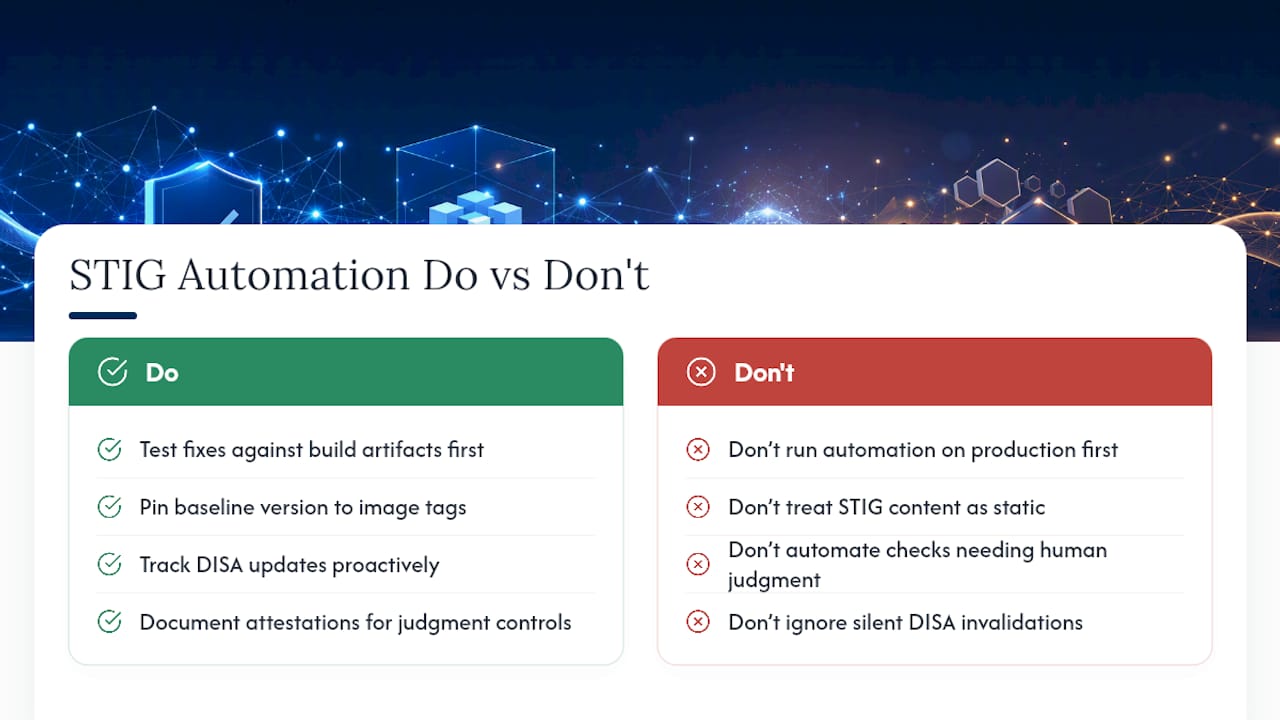
Most teams that struggle with STIG hardening automation made one early mistake: they let automation touch live production systems before the fixes were tested against a build artifact. Build-time remediation catches breakage before it reaches an operational environment, not after.
The second failure is treating STIG content as static. Pin your baseline version to your image tags, or a DISA update will quietly invalidate your last accreditation cycle without anyone noticing until an assessor does. And don't try to automate everything. Controls that genuinely require human judgment need documented attestations, not a script pretending to check a box it can't actually verify.
— Randy
Get a Managed STIG Automation Engagement
Building an internal SAF pipeline from scratch takes months most compliance teams don't have before their next assessment window. An alternative to a slow, staff-augmentation buildout for STIG hardening automation is a defined-scope engagement that delivers a working pipeline, version-pinned STIG repositories, and ATO-ready CKL and eMASS exports on a fixed scope, not an open-ended contract. Rutledge & Associates owns the outcome, from repo setup through artifact delivery, so your ISSOs get evidence packages instead of another dashboard to babysit. If your program needs a working pipeline before your next authorization cycle, request a scoped assessment at Primereadysub and get a defined statement of work back with a realistic timeline.
Where to Go for Official STIG Automation Documentation
- MITRE SAF for pillar definitions and toolchain overviews
- DISA STIGs for canonical benchmark content
- PowerStig and StigRepo for Windows-focused automation code
Sources
- MITRE Security Automation Framework (SAF)
- saf-cli documentation
- StigRepo (Microsoft GitHub)
- PowerStig (GitHub)
- How To Automate STIG Compliance At Scale | SteelCloud
FAQ
What Is the Difference Between HDF and CKL?
HDF (Heimdall Data Format) is the normalized output from automated scans; CKL is the DISA checklist format that STIG Viewer and eMASS packages actually consume, generated from HDF using the SAF CLI.
Can STIG Hardening Be Fully Automated?
No. Most technical controls can be automated through policy-as-code, but some controls, particularly physical security and certain procedural items, still require documented manual attestations.
Does PowerStig Work for Linux Systems?
PowerStig is built on PowerShell Desired State Configuration and targets Windows environments; Linux systems typically use Ansible, Chef, or Puppet for equivalent build-time remediation.
How Often Should STIG Automation Artifacts Be Updated?
Update automation artifacts whenever DISA releases a new STIG revision, and pin the benchmark version to your image tags so you can identify affected systems immediately.
What Does a Managed STIG Automation Engagement Typically Include?
A defined-scope engagement, like those Rutledge & Associates delivers, typically covers repository setup, CI/CD pipeline integration, and delivery of ATO-ready artifacts including CKL and eMASS exports.